Class 22 - Practical Guide On Internal Link | Advanced SEO Course 2026
Practical Guide On Internal Link
How to Build a Strong Internal Linking Architecture & Content Hub
Course Objective
Main Goal: Rank a service page (Money Page) on Google by creating a proper internal linking structure that helps both search engine bots and real users.
Target Keyword Example:Best Dental Clinic in Delhi (Money Page)
Core Rule: Use Pages instead of “Posts” in WordPress, because blog posts flatten the website structure and ruin the hierarchy.
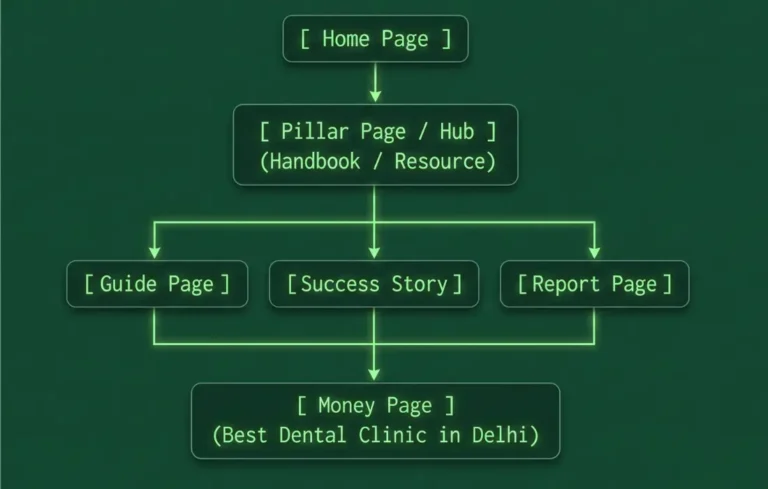
Structure Overview
Step 1: Create the Pillar Page (Content Hub)
Name it naturally: Use names like “Your Handbook for Oral Care in Delhi”. Do not use technical names like “Pillar Page for Dental SEO”.
First Paragraph Rule: Do not put links at the very top of the page. Write 1 or 2 intro paragraphs first to give context, so it doesn’t look like an HTML sitemap.
Add Links: Link out from this Pillar Page to all sub-pages (Guides, Case Studies, Reports).
Step 2: Link Sub-pages to the Money Page
Placement: Add the link to your Money Page near the top section of the article so users and bots can click it immediately.
Anchor Text Rules:
Keep it natural and relevant.
You can use exact keywords (best dental clinic in Delhi), but don’t force it into sentences where it doesn’t fit.
Use variations like plurals (best dental clinics) or rephrase it (Delhi’s best dental clinic) to keep reading smooth.
Ideal anchor text length: 3 to 7 words.
Avoid placing unnecessary links (like About Us or Contact Us) right next to this main link.
Step 3: Link Money Page and Sub-pages Back to the Pillar Page
Bottom Placement: At the bottom of sub-pages or the Money Page, add a link back to your Pillar Page (“For more information, visit our complete guide…”).
Rule: Never link away to other pages from the top section of your main Money Page.
Step 4: Connect the Pillar Page to Home Page & Navigation Menu
Home Page Section: Below the main banner (hero section) of your home page, add a dedicated section (like Image Cards) linking to your Pillar Pages/Handbooks.
Header Menu: Go to Appearance > Menus in WordPress, create a main menu item called “Handbooks”, and add your Pillar Pages under it.
Benefits of This Strategy
Faster Indexing & Ranking: The Pillar Page distributes PageRank to newly created pages, helping them get discovered and ranked faster by Google.
Better User Experience: Users can easily navigate back and forth between different related topics, increasing overall time spent on the site.
Protection Against Google Updates: A clean, well-structured internal link setup makes your website safer against Google algorithm updates.
Saves Money on Backlinks: Strong internal SEO reduces the need to buy or create a huge number of external backlinks.
Quick Checklist & Best Practices
Use Pages (not Posts) when building a site structure.
Keep anchor texts natural; don’t force exact keywords.
Do NOT open internal links in a new tab (target=”_blank”).
Do NOT use rel=”nofollow” or sponsored tags on internal links.
Always manually review and edit AI-generated content before publishing.
What's Next in the Course?
CRO (Conversion Rate Optimization): How to guide users to take action on the page.
Action Tracking: How to track user behavior and conversions.
Client Reporting: How to prove the ROI and success of your SEO efforts to clients.